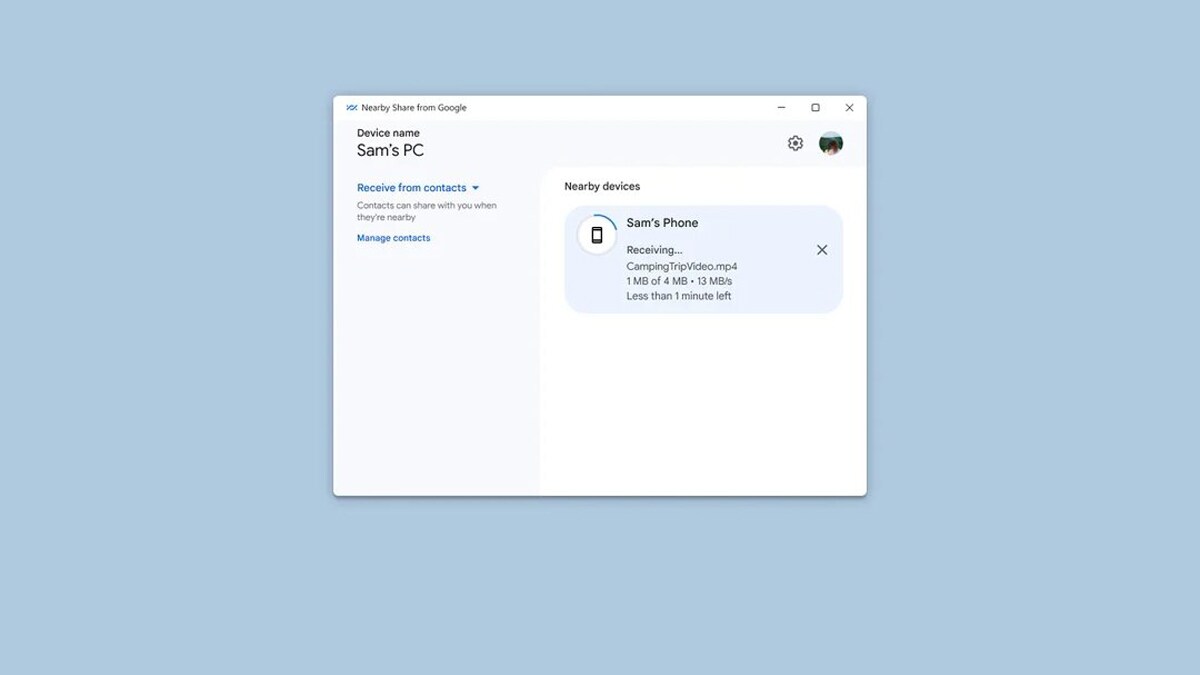
Google has announced the official rollout of the Nearby Share app for Windows PCs. Nearby Share enables users to easily share files across their phones, tablets, Chromebooks and more devices. Google has been testing a Windows version of the app since March 2023 and is now officially available to users.
“Today marks the official launch of Nearby Share with Windows, offering improved performance and new functionality,” Google wrote in a blog post.
Google said that the beta version of the app has seen more than 1.7 million downloads and people have transferred more than 50 million files between PC and Android devices since launch.
“Nearby Share for Windows, available as an app download on PCs around the world, has now been installed by more than 1.7 million people. With photos and videos being the most popular file types to send, we’ve seen over 50 million files transferred between PC and Android devices since launch,” Google said.
For the unversed, Nearby Share is a feature that lets users send files to other devices without compromising the quality, just by pressing a button. It is similar to what Apple offers with AirDrop.
With the official release, Google is adding new improvements to the Nearby Share for Windows app. Now,
- You can now see how long it will take to share big files like folders or videos, as the company has included the expected duration for file transfers in its app.
- You can also check image preview in the device notifications before sharing files, to make sure you are sending the right file.

“Since the app launched in beta in March 2023, Android has continued to improve overall speed and reliability. Updates have helped to reduce crashes and increase the success rate of file transfers,” the company added.
Google said that it is “working with partners like HP to include the Nearby Share app on select Windows PCs, such as the HP Dragonfly Pro”.
What is the minimum device requirement to use this feature?
To use the Nearby Share feature on Windows PCs, you need to meet these requirements. Here they are:
— A PC that runs on Windows 10 or higher, with a 64-bit version.
— An Android device that has Android 6.0 or higher.
— Both devices should have Bluetooth enabled.
— Both devices should have Wi-Fi or ethernet enabled.
— Both devices should be on the same network.
— Both devices should be within 5 meters or 16 feet of each other.
The post Google officially rolls out Android’s Nearby Share for Windows PCs: Here’s everything you should know appeared first on Techlusive.
from Techlusive https://ift.tt/GPJwcpo
via
IFTTT
Comments
Post a Comment
add