A recent report from WABetaInfo showcases a new WhatsApp feature that is rolling out to iOS beta testers. The new feature shows a redesigned WhatsApp settings menu with new shortcuts, and the user’s profile picture replacing the settings icon.
We can expect this redesign to streamline Android and iOS WhatsApp settings pages, which are somehow still different from each other. While the existing icons and settings remain intact, the redesign will add three new shortcuts, and reorder the existing settings to make them more accessible.
New WhatsApp settings menu vs current menu
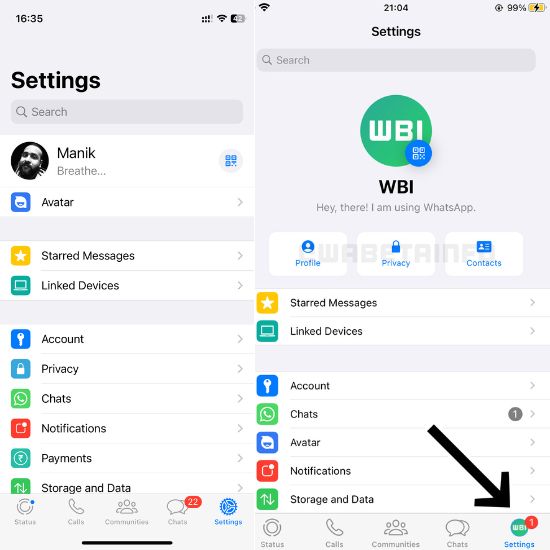
New WhatsApp settings menu vs current menu
The above picture should give you a clear idea about how the new WhatsApp settings menu is different from the current one. The company is currently rolling it out for iOS beta users, so we are not sure if the same menu will come to Android too.
Let us have a quick rundown of the current settings menu. Firstly, the settings icon is the same for everyone as a classic gears icon. When you open it, you will see your profile on top with the QR code at the right side. Then there is the starred messages and linked devices section to quickly access these features.
In the next section, you will find other settings like account, privacy, chats, payments, and storage info. This is followed by the help icon and the “Tell a friend” button, which lets you invite contacts to WhatsApp. The new menu reorders most of these settings but retains the current icons to keep them familiar.
Up top, you can see the new WhatsApp settings menu that shows the user’s profile picture with the QR code toggle. It is followed by WhatsApp status and quick toggles for Profile, Privacy, and Contacts. The Starred messages and Linked Devices section remains the same. However, Avatar is moved to the lower section, followed by the Notifications, and Storage and Data sections.
Overall, this is not a major design overhaul but a good redesign that puts more useful toggles and shortcuts at the top. It looks promising, but not all beta updates make it to the stable build, so take this one with a pinch of salt.
While we can only wait for new features to roll out, WhatsApp has recently added a couple of neat features. You can check out how to lock chats on WhatsApp and use the Update tab on WhatsApp for iOS.
The post Redesigned WhatsApp settings menu with new shortcuts coming soon appeared first on Techlusive.
from Techlusive https://ift.tt/z3NocDQ
via
IFTTT
Comments
Post a Comment
add