
Featured Post

AMD to invest $400 million in India by 2028: Here’s what we know

US chipmaker Advanced Micro Devices said on Friday it will invest around $400 million in India over the next five years and will build its largest design center in the tech hub of Bengaluru. AMD’s announcement was made by its Chief Technology Officer Mark Papermaster at an annual semiconductor conference that started Friday in Prime Minister Narendra Modi’s home state of Gujarat. Other speakers at the flagship event include Foxconn Chairman Young Liu and Micron CEO Sanjay Mehrotra. Despite being a late entrant, the Modi government has been courting investments into India’s nascent chip sector to establish its credentials as a chipmaking hub. AMD said it will open its new design centre campus in Bengaluru by end of this year and create 3,000 new engineering roles within five years. “Our India teams will continue to play a pivotal role in delivering the high-performance and adaptive solutions that support AMD customers worldwide,” Papermaster said. The new 500,000-square-foot (55,5...

Google rolling out new viewer mode in Meet: Here’s how to use it

Google is rolling out a new viewer mode in its video communication service ‘Meet’, which will allow users to select “Everyone is a viewer” when creating their Calendar invite.

Viewers are meeting attendees who cannot share their audio or video in the meeting, the tech giant said in a Workspace Updates blog post on Friday.

When using Google Meet for large meetings, designating attendees as “viewers” will help reduce potential meeting distractions, like audio disruptions. Also, this will keep the attendees focused on the speaker and the content of the meeting.

“When it’s time for the larger group to engage, hosts can transition viewers to contributors,” the company said.

“Viewers will be able to use Meet features such as Q&As and polls. Viewers will not be able to use in-meeting chat or emoji reactions– viewer support for these features is coming in the future,” it added.

Meanwhile, in April this year, the tech giant rolled out a 1080p video call option for users of its video communication service, in an effort to enhance the user experience. Another Meet Workspace feature allows workplace admins to provide special backgrounds for virtual meetings.

How to set “everyone is a viewer” in Google Meet

Google Meet everyone is a viewer

Google Meet everyone is a viewer

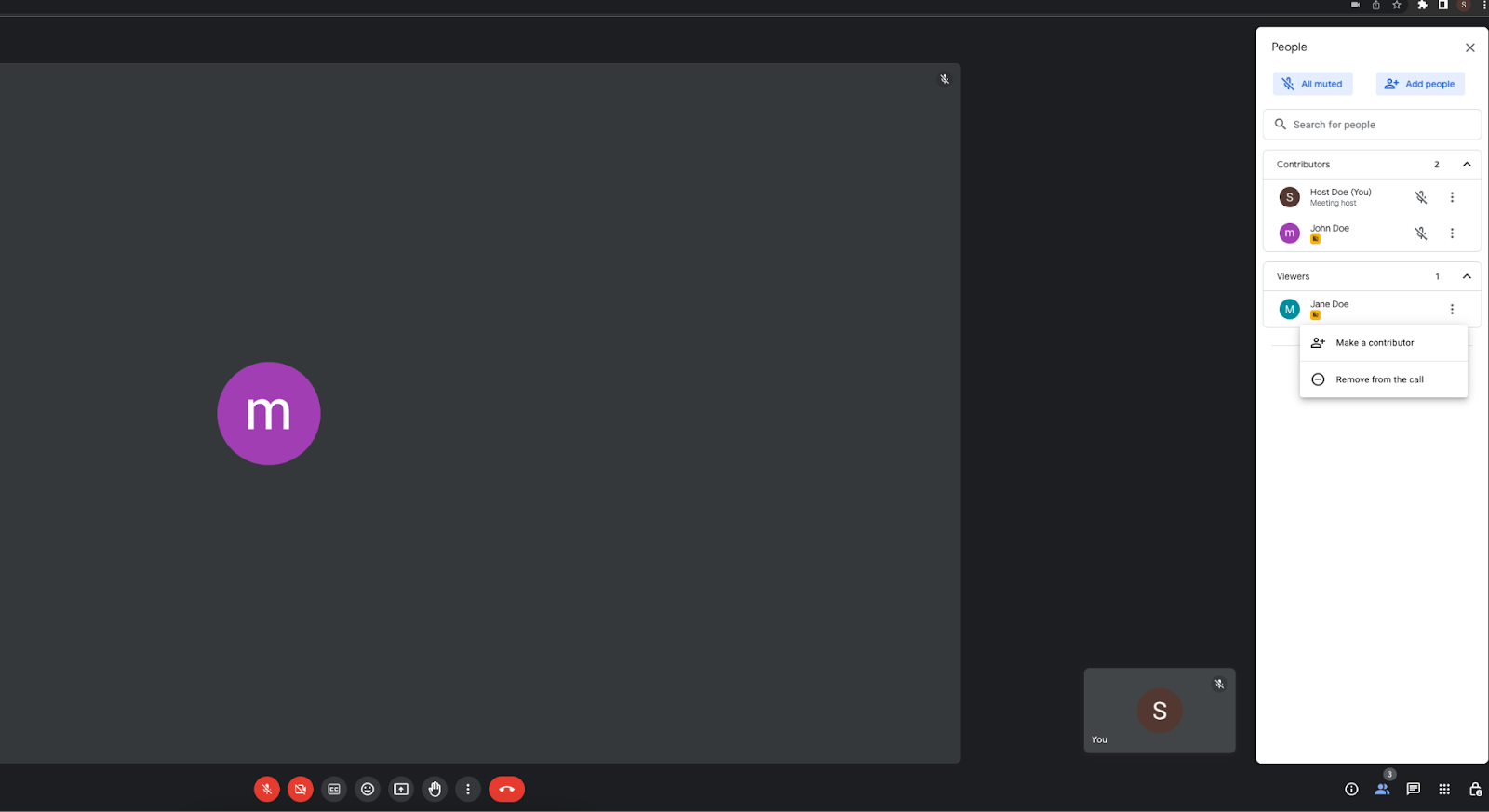
Once this feature rolls out, you will be able to set up large meetings with only core attendants sharing audio and video. Viewers will only be able to observe the meeting without sharing their video. To do so, go to video call options when setting up a Google Meet and select the ‘Guests’ section, and select ‘Everyone is a viewer by default’.

Google Meet everyone is a viewer- turn contributor

Google Meet turn viewers to contributors

After this, you can select the co-hosts and contributors from the same section. These people will be able to share their video and audio during the call. Hosts and co-hosts can also turn viewers into contributors during the meeting and allow them to share audio and video.

– With written inputs from IANS

The post Google rolling out new viewer mode in Meet: Here’s how to use it appeared first on Techlusive.


from Techlusive https://ift.tt/uKk03ZA
via IFTTT

Comments