WhatsApp has a lot of features that enable users to restrict the information that they share with specific contacts. The app not only enables users to restrict who can see their status updates and profile description, but also can see if they have read the shared messages or not. And if nothing else works, users can block a contact altogether. While the feature is quite simple to use, WhatsApp users still need to tap a bunch of buttons in the app in order to block a contact. Now, word is that the company is working on improving the feature to block a contact in the app further.
According to a report WABetaInfo, WhatsApp is working on adding two new ways to block a contact in its app. As of now if users need to block a contact, they need to open the chat with the contact, tap the name of the contact in the individual chat, scroll down and tap the Block [Contact Name] option, and finally tap the Block option. Now, the company is introducing two new ways of blocking a contact.
Firstly, WhatsApp will be providing the option to block a contact in the chat list. This will enable users to block a contact without opening a chat. “The first entry point is available in the chat list by opening the chat options (in some cases, it may also be available within the app header) so you can easily block a contact without opening the chat,” the blog site wrote in its post.
Secondly, the company will provide the option to block when a user receives a message from an unknown contact. In this case, the option will be available even when WhatsApp isn’t open. Here’s a screenshot of how these changes will look like:
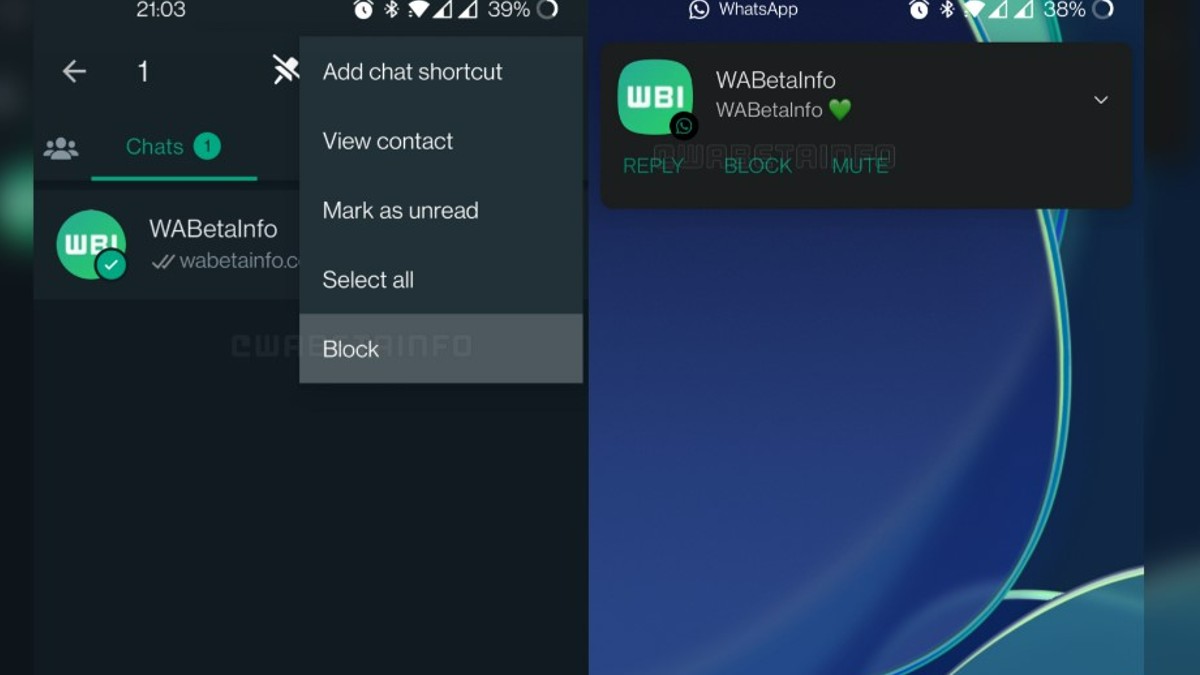
Image: WABetaInfo
As far as availability is concerned, the blog site says that the company has started rolling out this feature to select beta users and that WhatsApp beta for Android users who are running the 2.23.2.10 version of the app. While the report makes no mention of the feature being developed for the iOS app, it is not hard to guess that the feature will also be available to iOS users when it is formally released.
The post WhatsApp wants to make it easy for you to block pesky contacts: Here’s what it plans to do appeared first on BGR India.
from BGR India https://ift.tt/txn1XRF
via
IFTTT
Comments
Post a Comment
add